针对之前我提出的手机上容易误触的方案,我想到了一个暂时的替代方案 [Regarding the issue I previously raised about accidentally triggering actions on mobile, I've thought of a temporary alternative solution]
https://github.com/devv-ai/devv/issues/135
针对这个问题我想到了一个方案,就是使用自定义脚本 UserScript 来在页面上插入一个置顶的按钮,按这个按钮就会触发原来的回车按钮,这样就避免了手机上原来的按钮太小会误触到参考页面的问题。
Regarding the accidental trigger issue on mobile, I propose using a UserScript to add a sticky button that triggers the Enter key functionality, avoiding the small original button that can accidentally navigate away from the page.
下面是相关的代码:
Below is the code:
// ==UserScript==
// @name         Add Floating Button to Trigger Search
// @namespace    http://tampermonkey.net/
// @version      0.2
// @description  Add a floating button to trigger the search button on devv.ai
// @author       You
// @match        https://devv.ai/*
// @grant        none
// ==/UserScript==

(function() {
    'use strict';

    // Function to create and add the floating button
    function addFloatingButton() {
        // Create the floating button
        const floatingButton = document.createElement('button');
        floatingButton.innerText = '🔍';
        floatingButton.style.position = 'fixed';
        floatingButton.style.bottom = '20px';
        floatingButton.style.right = '20px';
        floatingButton.style.width = '60px';
        floatingButton.style.height = '60px';
        floatingButton.style.zIndex = '9999';
        floatingButton.style.backgroundColor = '#6200ea';
        floatingButton.style.color = '#ffffff';
        floatingButton.style.border = 'none';
        floatingButton.style.borderRadius = '50%';
        floatingButton.style.fontSize = '24px';
        floatingButton.style.boxShadow = '0 4px 8px rgba(0, 0, 0, 0.2)';
        floatingButton.style.cursor = 'pointer';
        floatingButton.style.transition = 'background-color 0.3s, transform 0.3s';

        // Add hover effect
        floatingButton.addEventListener('mouseover', function() {
            floatingButton.style.backgroundColor = '#3700b3';
            floatingButton.style.transform = 'scale(1.1)';
        });

        floatingButton.addEventListener('mouseout', function() {
            floatingButton.style.backgroundColor = '#6200ea';
            floatingButton.style.transform = 'scale(1)';
        });

        // Add click event to the floating button
        floatingButton.addEventListener('click', function() {
            const searchButton = document.querySelector('button[aria-label="Search"]');
            if (searchButton) {
                searchButton.click();
            } else {
                alert('Search button not found!');
            }
        });

        // Append the floating button to the body
        document.body.appendChild(floatingButton);
    }

    // Run the function to add the floating button
    addFloatingButton();
})();
iOS 上可以安装 UserScript 然后安装这个脚本就可以在 Safari 里面用了。Andriod 上面可以用 Firefox 然后安装油猴插件。
On iOS, you can install UserScript and then install this script to use it in Safari. On Android, you can use Firefox and install the Tampermonkey extension.
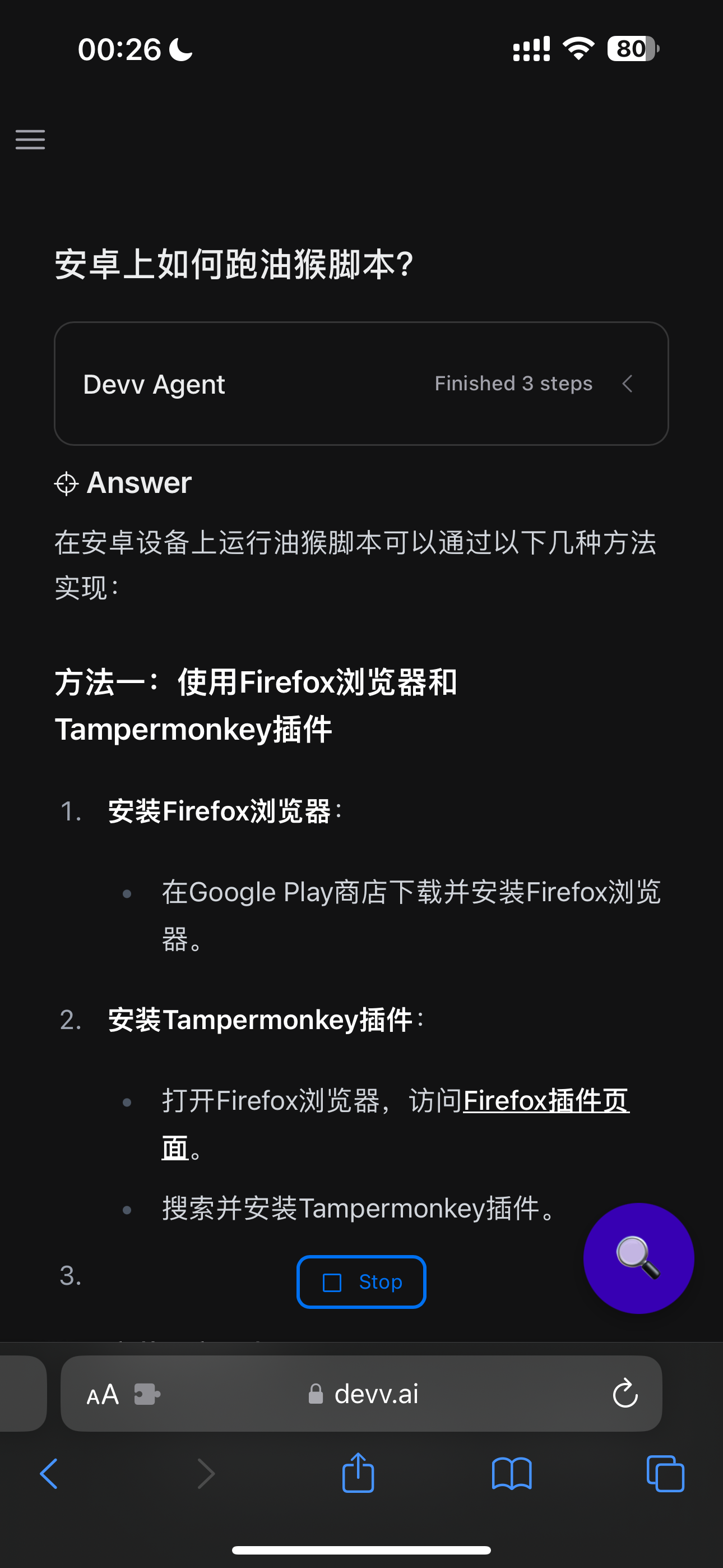
显示效果如图:
Here is the result:
Comments1
Bohan
May 21, 2024
That's really cool!